drivePACK Editor software website general index
• Introduction.
• Software guide and tutorials.
• ROM PACK data organisation and instructions.
• License and downloads.
• Software guide and tutorials.
• ROM PACK data organisation and instructions.
• License and downloads.
ROM PACK data organisation and instructions
In this page you'll find a detailed technical description of the information organisation and the instructions inside a CASIO ROM PACK catridge:
- Themes organisation in a ROM PACK.
- Structure of a theme.
- Instructions.
- Main melody channel and obbligato channel instructions.
- Chords and rhythm channel instructions.
- More information...
The hardware, the electrical and the low level logical description of the ROM PACK cartridges is available in the technical section of the drivePACK emulator website.
Most part of the information presented here was obtained through reverse engineering and analysing the content of original ROM PACKs with a conventional binary editor and the drivePACK Editor software tool. The CASIO US4624171 Auto-playing apparatus patent available on Google Patents was also very useful in understanding the organisation of information within a ROM PACK cartridge. The information in this site may not be entirely accurate or may have some imprecision so any correction or observation is welcome. The information provided by following websites and documents was also useful:
- PiSi Elektronik - Casio FX-700P - hardware
- Sean Riddle's - Chips decap info - OKI M5268 ROM
- Crumblenet ROM PACKs
- Service manual & part list SK-8
- CASIO US4624171 Auto-playing apparatus patent
- Themes organisation in a ROM PACK.
- Structure of a theme.
- Instructions.
- Main melody channel and obbligato channel instructions.
- Chords and rhythm channel instructions.
- More information...
The hardware, the electrical and the low level logical description of the ROM PACK cartridges is available in the technical section of the drivePACK emulator website.
Most part of the information presented here was obtained through reverse engineering and analysing the content of original ROM PACKs with a conventional binary editor and the drivePACK Editor software tool. The CASIO US4624171 Auto-playing apparatus patent available on Google Patents was also very useful in understanding the organisation of information within a ROM PACK cartridge. The information in this site may not be entirely accurate or may have some imprecision so any correction or observation is welcome. The information provided by following websites and documents was also useful:
- PiSi Elektronik - Casio FX-700P - hardware
- Sean Riddle's - Chips decap info - OKI M5268 ROM
- Crumblenet ROM PACKs
- Service manual & part list SK-8
- CASIO US4624171 Auto-playing apparatus patent
Themes organisation in a ROM PACK
All ROM PACK cartridges start with a header that contains the general information of the cartridge: a start work data, the number of themes in the cartridge, and a sort of index with the start address of each theme. The addresses that can be read in a ROM PACK file refer to nibbles addresses not to byte addresses. To jump to the data pointed to by one of these nibble addresses within file containing the binary dump of a ROM in bytes, these addresses must be divided by 2. The following image is an example of the organisation of the information of the themes in any ROM PACK cartridge:
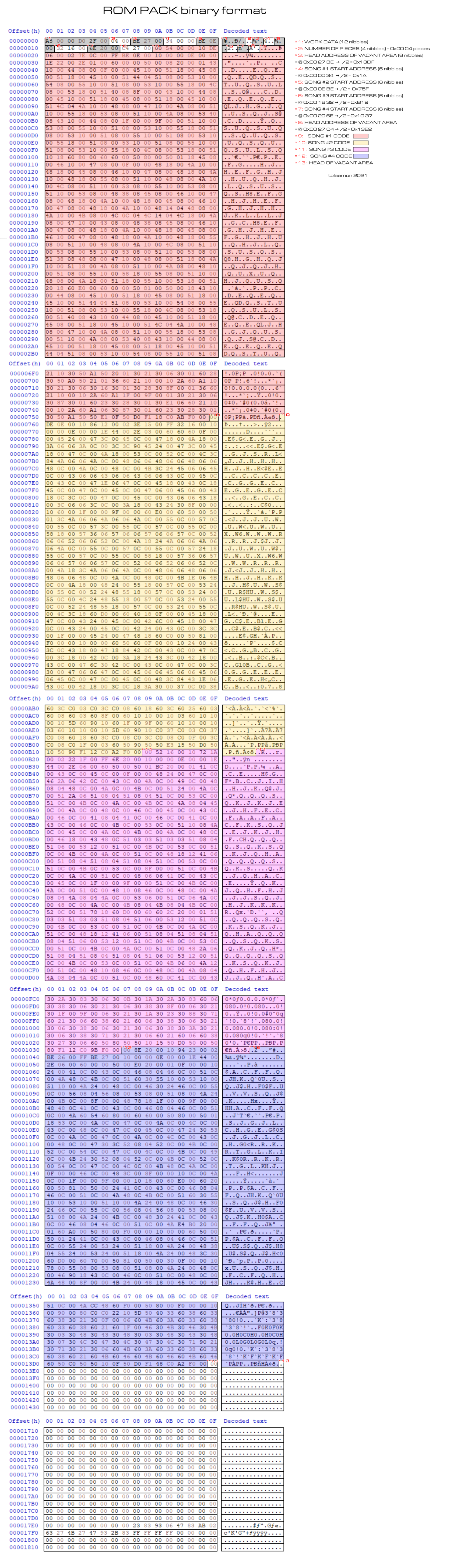
Header and themes organisation in ROM PACK cartridges.
The musical information of any theme in a ROM PACK is organised in a header followed by three blocks. Each block corresponds to a musical channel: the main melody channel ( melody 1 channel ), the obbligato channel ( melody 2 channel ) and the chords and rhythm channel. The theme header contains the following addresses: the main melody start address, the obbligato start address, the chords and rhythm start address and the theme end address. The main melody block contains the sequence of instructions of the main melody channel. The obbligato block contains the sequence of instructions of accompaniment melody channel. The chords and rhythm block contains the sequence of instructions of the chords channel. Each instruction in the main melody and obbligato channels takes 3 bytes, while the instructions on the chords channels take 2 bytes each one.
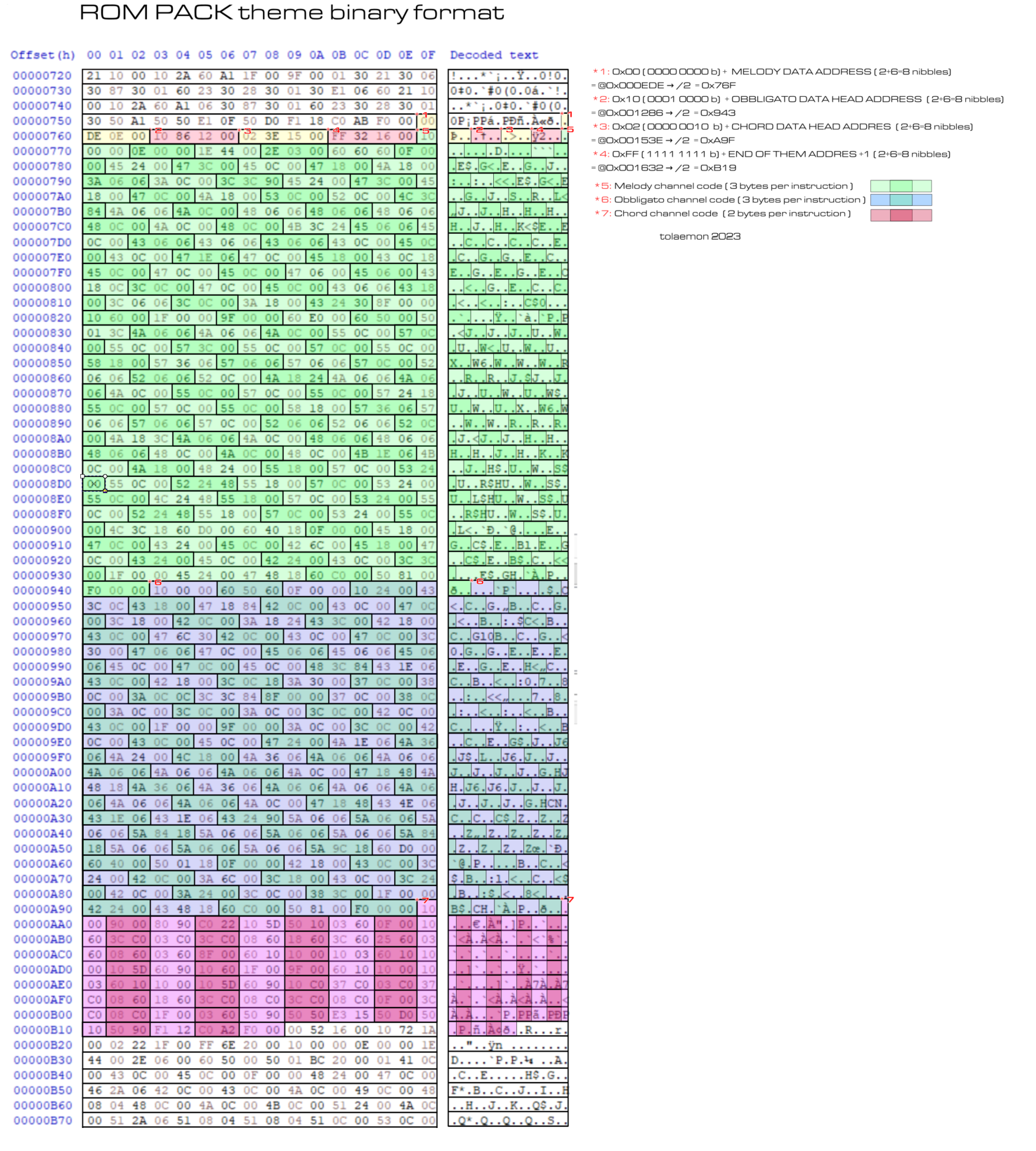
General structure of a ROM PACK theme.
Structure of a theme
As exposed in previous sections, a ROM PACK cartridge may have one or more themes. Each ROM PACK theme data is organised in three blocks. Each block corresponds to a channel: the main melody channel ( melody 1 channel ), the obbligato channel ( melody 2 channel ) and the chords and rhythm channel. The following image shows the basic organisation of the instructions inside each channel. Nearly all the the ROM PACK themes follow this structure:
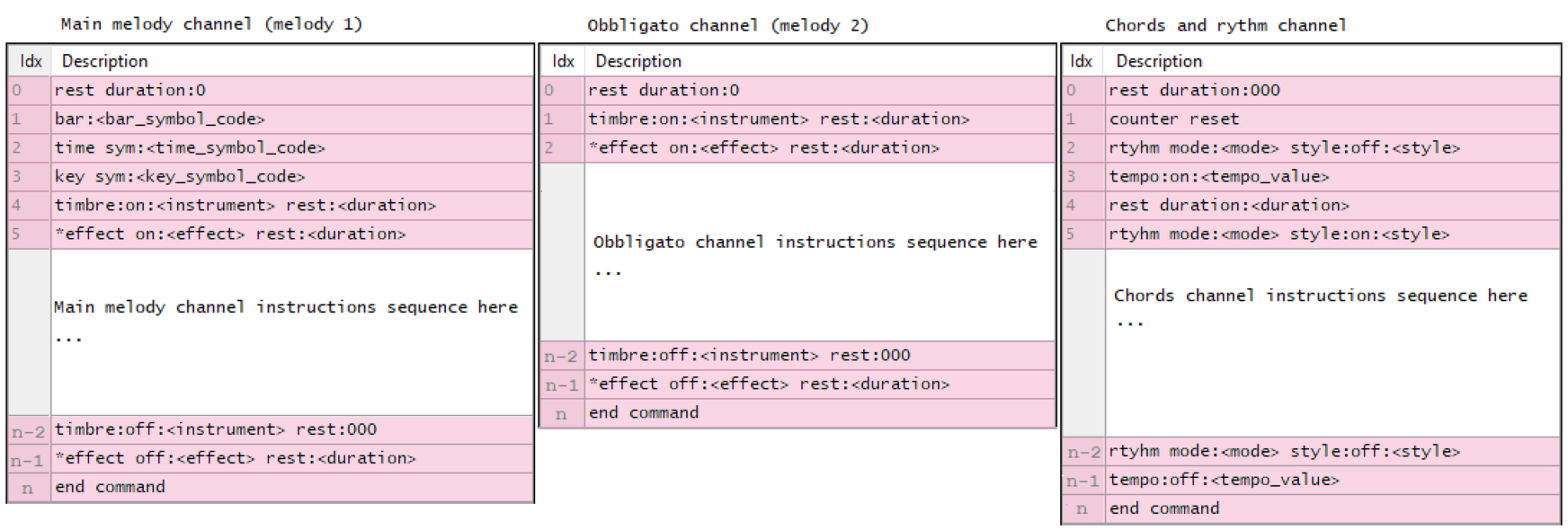
Typical organisation of the sequence of instructions on each of the 3 channels of ROM PACK theme
* Optional instruction.
The image below is an example of a theme codification corresponding to the Ich bin ein musikante (Unterlanders Heimweh) theme ( theme 1 of the RO-551 - World songs cartridge ):
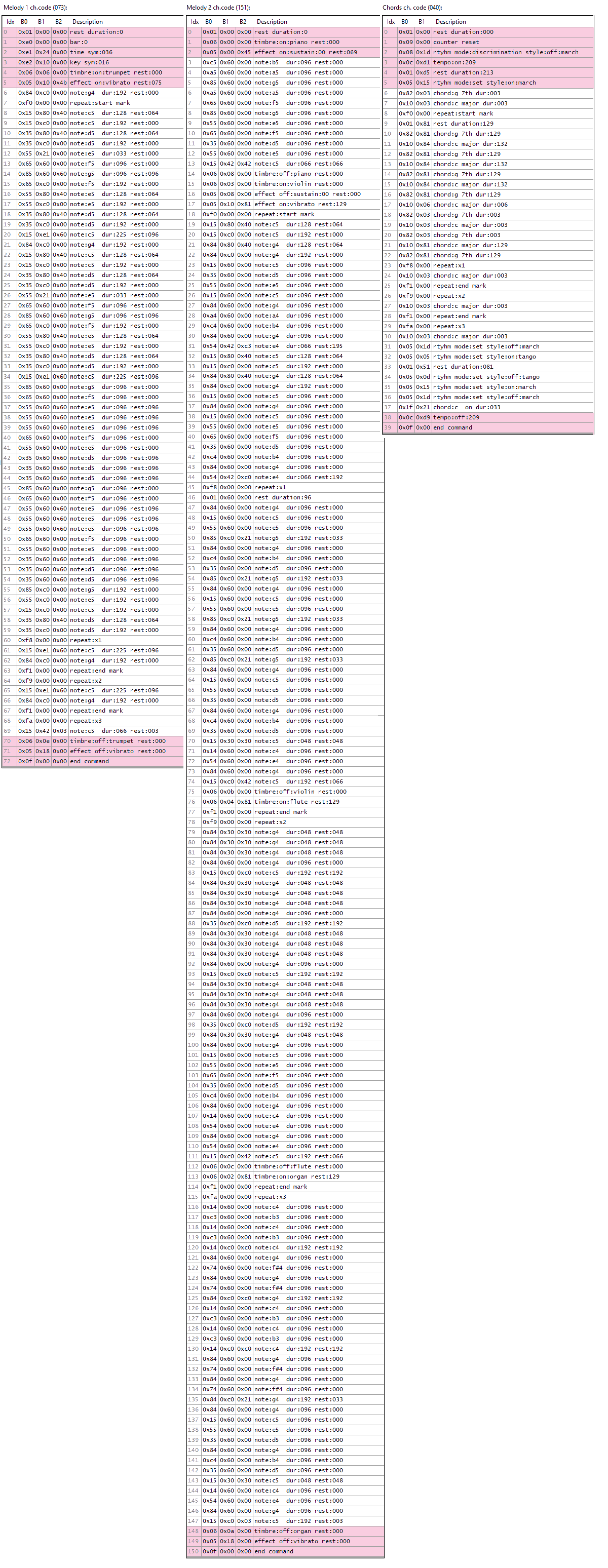
Example of theme codification. Click on the image to see the complete theme program.
Instructions
The following sections describe the different instructions (also referred to as commands) that can be found in the theme's channels. In these sections, the binary code associated with each command is explained, along with the bits corresponding to different parameters, their meaning, and interpretation, followed by some examples.
Attention must be paid to certain 8-bit parameters whose 2 nibbles (4 bits) need to be interpreted in reverse. That is, in some byte parameters, the 4 high bits correspond to the 4 low bits of the parameter value, while the 4 low bits of the byte correspond to the high bits of the parameter value. These types of parameters are marked with an asterisk (*) on each instruction description.
The commands are organised into two groups according to the type of channel where they are used in:
- Main melody (melody 1) and obbligato (melody 2) channel instructions: the commands in these channels consist of 3 bytes. Although they are placed here in the same group, some are used exclusively in the main melody channel, while others are specific to the obbligato channel. The other commands can be found in both the main melody and obbligato channels:
- Effect command
- Rest command
- Note command
- Repeat command
- Tie command
- Key command
- Time command
- End command
- Bar command
- Double duration command
- Chords and rhythm channel instructions: the commands in that channel consist of 2 bytes.
- Rest command
- Chord command
- Repeat command
- Rhythm command
- Tempo command
- Counter reset command
- End command
- Double duration command
Attention must be paid to certain 8-bit parameters whose 2 nibbles (4 bits) need to be interpreted in reverse. That is, in some byte parameters, the 4 high bits correspond to the 4 low bits of the parameter value, while the 4 low bits of the byte correspond to the high bits of the parameter value. These types of parameters are marked with an asterisk (*) on each instruction description.
The commands are organised into two groups according to the type of channel where they are used in:
- Main melody (melody 1) and obbligato (melody 2) channel instructions: the commands in these channels consist of 3 bytes. Although they are placed here in the same group, some are used exclusively in the main melody channel, while others are specific to the obbligato channel. The other commands can be found in both the main melody and obbligato channels:
- Effect command
- Rest command
- Note command
- Repeat command
- Tie command
- Key command
- Time command
- End command
- Bar command
- Double duration command
- Chords and rhythm channel instructions: the commands in that channel consist of 2 bytes.
- Rest command
- Chord command
- Repeat command
- Rhythm command
- Tempo command
- Counter reset command
- End command
- Double duration command
Main melody channel and obbligato channels instructions
These are the commands that can be found in the main melody ( melody 1 ) and the obbligato ( melody 2 ) channels:
- Instrument (timbre): sets the instrument to use with the following notes of the channel.
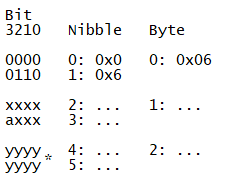
Where:
x: instrument code (total 7bits)
a: 0 instrument is ON, 1 instrument is OFF (total 1bit)
y: rest duration, silence before next command ( * total 8 bits: nibble 4: byte 2 4 low bits, nibble 5: byte 2 4 high bits)
Instrument codes are (A is the 0:ON 1:OFF bit):
Bits
7654 3210
0000 a000 : piano
0000 a001 : harpsichord
0000 a010 : organ
0000 a011 : violin
0000 a100 : flute
0000 a101 : clarinet
0000 a110 : trumpet
0000 a111 : celesta
Instruction examples (3 bytes):
0x06 0x03 0x08 : Timbre: ON violin rest:8
0x06 0x0b 0x08 : Timbre: OFF violin rest:8
0x06 0x06 0x00 : Timbre: ON trumpet rest:0
0x06 0x0e 0x00 : Timbre: OFF trumpet rest:0
x: instrument code (total 7bits)
a: 0 instrument is ON, 1 instrument is OFF (total 1bit)
y: rest duration, silence before next command ( * total 8 bits: nibble 4: byte 2 4 low bits, nibble 5: byte 2 4 high bits)
Instrument codes are (A is the 0:ON 1:OFF bit):
Bits
7654 3210
0000 a000 : piano
0000 a001 : harpsichord
0000 a010 : organ
0000 a011 : violin
0000 a100 : flute
0000 a101 : clarinet
0000 a110 : trumpet
0000 a111 : celesta
Instruction examples (3 bytes):
0x06 0x03 0x08 : Timbre: ON violin rest:8
0x06 0x0b 0x08 : Timbre: OFF violin rest:8
0x06 0x06 0x00 : Timbre: ON trumpet rest:0
0x06 0x0e 0x00 : Timbre: OFF trumpet rest:0
- Effect: sets the effect to apply on the following notes of the channel.
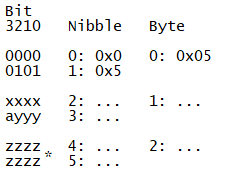
Where:
x: effect code (total 4 bits)
a: 0 effect is ON , 1 effect is OFF (total 1bit)
y: effect value from 0 to 7 (total 3bits). When the effect is OFF (when a is 1) all y bits are 0.
z: rest duration, silence before next command ( * total 8 bits: nibble 4: byte 2 4 low bits, nibble 5: byte 2 4 high bits)
Effect codes are:
Bits
3210
0000 : sustain
0001 : vibrato
0010 : delay vibrato
Instruction examples (3 bytes):
0x05 0x10 0x0e : Effect: ON vibrato rest:14
0x05 0x01 0x18 : Effect: ON sustain:01 rest:24
x: effect code (total 4 bits)
a: 0 effect is ON , 1 effect is OFF (total 1bit)
y: effect value from 0 to 7 (total 3bits). When the effect is OFF (when a is 1) all y bits are 0.
z: rest duration, silence before next command ( * total 8 bits: nibble 4: byte 2 4 low bits, nibble 5: byte 2 4 high bits)
Effect codes are:
Bits
3210
0000 : sustain
0001 : vibrato
0010 : delay vibrato
Instruction examples (3 bytes):
0x05 0x10 0x0e : Effect: ON vibrato rest:14
0x05 0x01 0x18 : Effect: ON sustain:01 rest:24
- Rest duration: sets the time to wait in silence before executing the following instructions of the channel. Double duration command does not seem to work properly after the melody channels rest duration commands, so successive melody channel rest commands may be useful in that situations where a rest command with a rest parameter greaten than 255 is required.
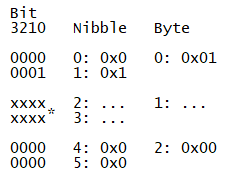
Where:
x: rest time (silence) before next command ( * total 8 bits: nibble 2: byte 1 4 low bits, nibble 3: byte 1 4 high bits)
Instruction examples (3 bytes):
0x01 0x00 0x00 : Rest duration:0 ( usually at the beginning of each channel )
0x01 0x0c 0x00 : Rest duration:12
0x01 0x42 0x00 : Rest duration:66
x: rest time (silence) before next command ( * total 8 bits: nibble 2: byte 1 4 low bits, nibble 3: byte 1 4 high bits)
Instruction examples (3 bytes):
0x01 0x00 0x00 : Rest duration:0 ( usually at the beginning of each channel )
0x01 0x0c 0x00 : Rest duration:12
0x01 0x42 0x00 : Rest duration:66
- Note: sets the following note to play, the duration of that note and the silence before the following note. The note will be played with the instrument previously set with the Instrument (timbre) command. Lowest and highest allowed notes are F3 and C6 respectively.
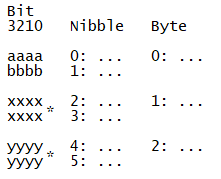
Where:
a: note code (total 4 bits)
b: octave code (total 4 bits)
x: note duration ( * total 8 bits: nibble 2: byte 1 4 low bits, nibble 3: byte 1 4 high bits)
y: rest duration, silence before next command ( * total 8 bits: nibble 4: byte 2 4 low bits, nibble 5: byte 2 4 high bits)
Note codes are (from 0x1 to 0xB):
Bits
3210
0001 : 1 : C
0010 : 2 : C#
0011 : 3 : D
0100 : 4 : D#
0101 : 5 : E
0110 : 6 : F
0111 : 7 : F#
1000 : 8 : G
1001 : 9 : G#
1010 : 10: A
1011 : 11: A#
1100 : 12: B
Octave codes are (from 0x3 to 0x5):
Bits
3210
0011 : 3 : 3rd octave
0100 : 4 : 4th octave
0101 : 5 : 5th octave
a: note code (total 4 bits)
b: octave code (total 4 bits)
x: note duration ( * total 8 bits: nibble 2: byte 1 4 low bits, nibble 3: byte 1 4 high bits)
y: rest duration, silence before next command ( * total 8 bits: nibble 4: byte 2 4 low bits, nibble 5: byte 2 4 high bits)
Note codes are (from 0x1 to 0xB):
Bits
3210
0001 : 1 : C
0010 : 2 : C#
0011 : 3 : D
0100 : 4 : D#
0101 : 5 : E
0110 : 6 : F
0111 : 7 : F#
1000 : 8 : G
1001 : 9 : G#
1010 : 10: A
1011 : 11: A#
1100 : 12: B
Octave codes are (from 0x3 to 0x5):
Bits
3210
0011 : 3 : 3rd octave
0100 : 4 : 4th octave
0101 : 5 : 5th octave
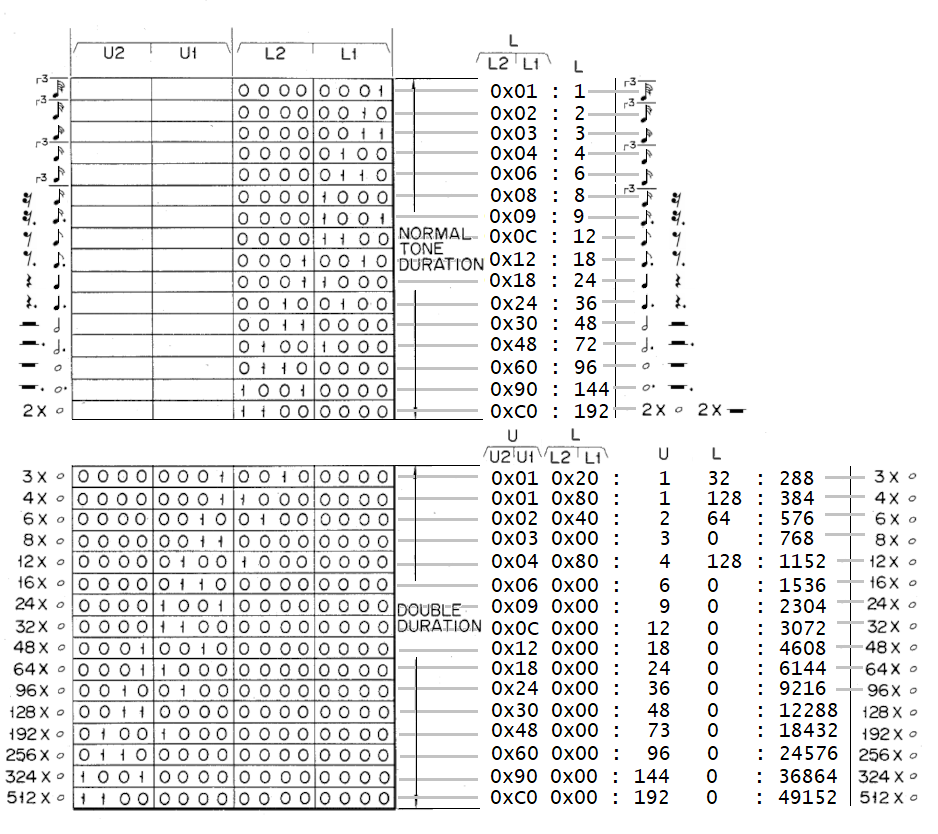
Instruction examples (3 bytes):
0x84 0x90 0x30 : Note:g octave:4 dur:144 rest dur:048
0x74 0x21 0x60 : Note:f# octave:4 dur:033 rest dur:096
0x15 0x81 0x00 : Note:c octave:5 dur:129 rest dur:000
0x83 0xc0 0x00 : Note:g octave:3 dur:192 rest dur:000
- Repeat: encodes the musical symbols used to delimit and to repeat specific sections of the theme's main or obbligato melody channel. Following image shows the algorithm followed by the keyboard to execute the repeat command:
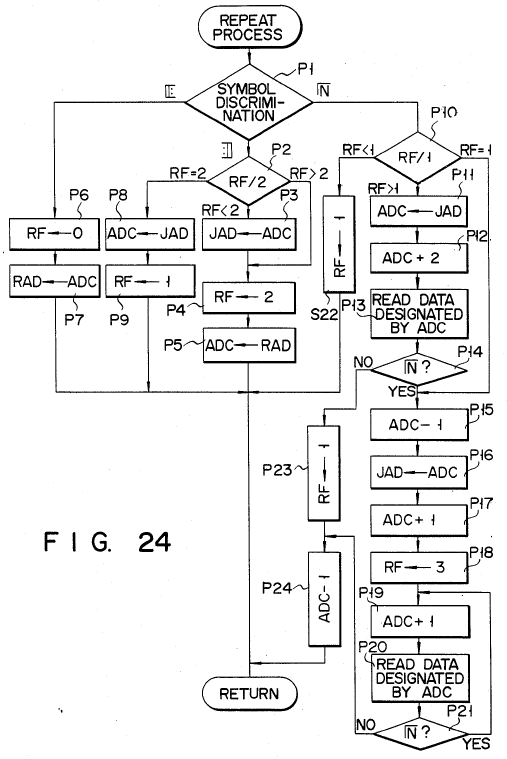
Fig 24 from
CASIO US4624171 Auto-playing apparatus patent ( ceased 2004-04-05 )
with the algorithm followed by the keyboard to execute the repeat command.
Melody repeat command is encoded this way:
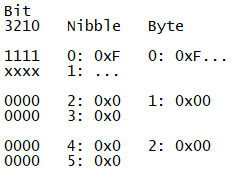
Where:
x: Repeat section code (total 4bits)
Repeat section codes are:
Bits
3210
0000 : 𝄃: start bar line, repeat section start mark.
0001 : :𝄂 end bar line, repeat section end mark.
1000 : 1. repeat x1
1001 : 2. repeat x2
1010 : 3. repeat x3
1011 : 4. repeat x4
1100 : 5. repeat x5
1101 : 6. repeat x6
1110 : 7. repeat x7
1110 : 8. repeat x8
Instruction examples (3 bytes):
0xf0 0x00 0x00 : Repeat: repeat section start mark.
0xf8 0x00 0x00 : Repeat: x1 (1.)
0xfb 0x00 0x00 : Repeat: x4 (4.)
0xf1 0x00 0x00 : Repeat: repeat section end mark.
The following image is an example of use of the repeat command in the main or obbligato melody channel:
x: Repeat section code (total 4bits)
Repeat section codes are:
Bits
3210
0000 : 𝄃: start bar line, repeat section start mark.
0001 : :𝄂 end bar line, repeat section end mark.
1000 : 1. repeat x1
1001 : 2. repeat x2
1010 : 3. repeat x3
1011 : 4. repeat x4
1100 : 5. repeat x5
1101 : 6. repeat x6
1110 : 7. repeat x7
1110 : 8. repeat x8
Instruction examples (3 bytes):
0xf0 0x00 0x00 : Repeat: repeat section start mark.
0xf8 0x00 0x00 : Repeat: x1 (1.)
0xfb 0x00 0x00 : Repeat: x4 (4.)
0xf1 0x00 0x00 : Repeat: repeat section end mark.
The following image is an example of use of the repeat command in the main or obbligato melody channel:
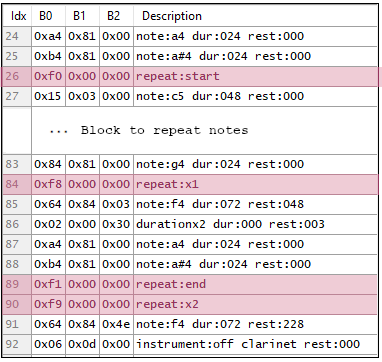
Example of use of the melody repeat command.
- Tie: the musical tie command to perform following notes like one note equal in length to the two.
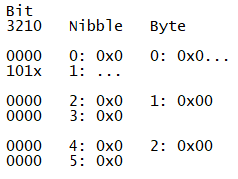
Where:
x: 0 tie is ON , 1 tie is OFF (total 1bit)
Instruction examples (3 bytes):
0x0b 0x00 0x00 Tie:off
0x0a 0x00 0x00 Tie:on
x: 0 tie is ON , 1 tie is OFF (total 1bit)
Instruction examples (3 bytes):
0x0b 0x00 0x00 Tie:off
0x0a 0x00 0x00 Tie:on
- Key: the key of the melody, that is the scale around which the piece is composed.
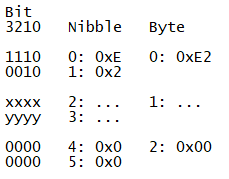
Where:
x,y: key symbol code (total 8 bits).
Available key symbol codes are:
x,y: key symbol code (total 8 bits).
Available key symbol codes are:
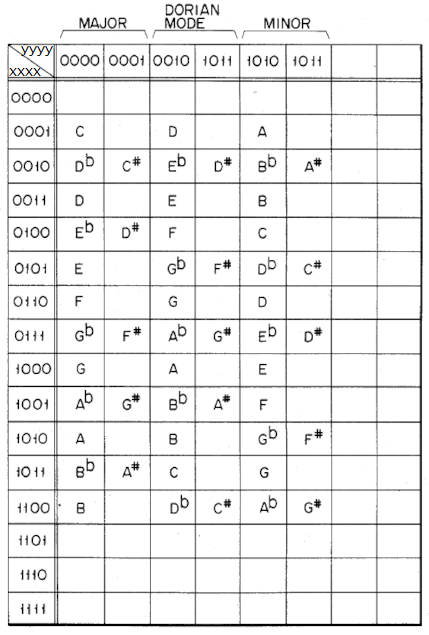
Instruction examples (3 bytes):
0xe2 0x10 0x00 : Key symbol:0001 0000 : C MAJOR
0xe2 0x80 0x00 : Key symbol:1000 0000 : G MAJOR
0xe2 0x1a 0x00 : Key symbol:0001 1010 : A MINOR
0xe2 0x60 0x00 : Key symbol:0110 0000 : F MAJOR
0xe2 0x10 0x00 : Key symbol:0001 0000 : C MAJOR
0xe2 0x80 0x00 : Key symbol:1000 0000 : G MAJOR
0xe2 0x1a 0x00 : Key symbol:0001 1010 : A MINOR
0xe2 0x60 0x00 : Key symbol:0110 0000 : F MAJOR
- Time: the time signature of the theme.
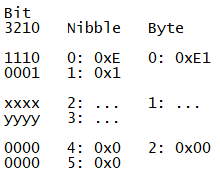
Where:
x,y: time symbol code (total 8 bits).
Available time symbol codes are:
x,y: time symbol code (total 8 bits).
Available time symbol codes are:
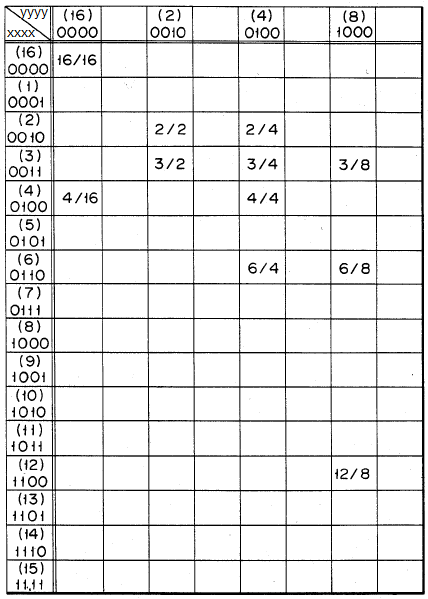
Instruction examples (3 bytes):
0xe1 0x44 0x00 : Time symbol:0100 0100 : 4/4
0xe1 0x34 0x00 : Time symbol:0011 0100 : 3/4
0xe1 0x32 0x00 : Time symbol:0011 0010 : 3/2
0xe1 0x44 0x00 : Time symbol:0100 0100 : 4/4
0xe1 0x34 0x00 : Time symbol:0011 0100 : 3/4
0xe1 0x32 0x00 : Time symbol:0011 0010 : 3/2
- Bar: the bar symbol between the different time sections of the theme.
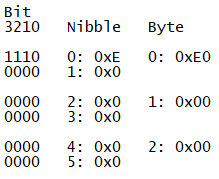
Instruction examples (3 bytes):
0xe0 0x00 0x00 : Bar symbol
0xe0 0x00 0x00 : Bar symbol
- End: to indicate the end of the melody channel. It is usually last command in the main melody or obbligato channels.
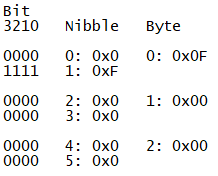
Instruction examples (3 bytes):
0x0f 0x00 0x00 : End of channel
0x0f 0x00 0x00 : End of channel
- Double duration: this command always applies over the previous command ( it is never used alone ). It extends the duration of the note and/or the rest encoded in that previous command. So if there is a double duration command behind another command, the note duration bits of the previous command are combined with the note duration bits of the double duration command to get a larger duration value. The same for the rest duration bits. If the previous command does not have note duration bits or rest duration parameter then the bits of the double duration command are not considered. See the figure in note command section to understand how the bytes in the double duration command are used.
Double duration commands may be tricky, and may not always work as expected. For example, when combined after a rest duration command in a melody channel, they have no effect; however, they do work when placed after an instrument command.
Double duration commands may be tricky, and may not always work as expected. For example, when combined after a rest duration command in a melody channel, they have no effect; however, they do work when placed after an instrument command.
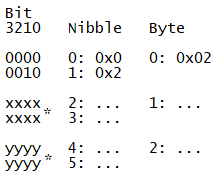
Where:
x: extends the tone duration by adding 8 upper bits (U:U2 U1) to the previous note tone duration ( * total 8 bits: nibble 2: byte 1 4 low bits, nibble 3: byte 1 4 high bits). If previous command has not tone duration bits this bits are not considered and should be 0000 (8 bits).
y: extends the rest duration by adding 8 upper bits (U:U2 U1)to the previous note rest duration ( * total 8 bits: nibble 4: byte 2 4 low bits, nibble 5: byte 2 4 high bits).If previous command has not tone duration bits this bits are not considered and should be 0000 (8 bits).
Instruction examples (3 + 3 bytes):
0x06 0x07 0x81 0x02 0x00 0x10: Timbre:on:Celesta rest:129 2Xduration Note:000 Rest:016
0xc4 0x83 0x08 0x02 0x00 0x10: Note:b4 dur:131 rest:008 2Xduration Note:000 Rest:016
0xa4 0x84 0x80 0x02 0x00 0x10: Note:a4 dur:132 rest:128 2Xduration Note:000 Rest:016
x: extends the tone duration by adding 8 upper bits (U:U2 U1) to the previous note tone duration ( * total 8 bits: nibble 2: byte 1 4 low bits, nibble 3: byte 1 4 high bits). If previous command has not tone duration bits this bits are not considered and should be 0000 (8 bits).
y: extends the rest duration by adding 8 upper bits (U:U2 U1)to the previous note rest duration ( * total 8 bits: nibble 4: byte 2 4 low bits, nibble 5: byte 2 4 high bits).If previous command has not tone duration bits this bits are not considered and should be 0000 (8 bits).
Instruction examples (3 + 3 bytes):
0x06 0x07 0x81 0x02 0x00 0x10: Timbre:on:Celesta rest:129 2Xduration Note:000 Rest:016
0xc4 0x83 0x08 0x02 0x00 0x10: Note:b4 dur:131 rest:008 2Xduration Note:000 Rest:016
0xa4 0x84 0x80 0x02 0x00 0x10: Note:a4 dur:132 rest:128 2Xduration Note:000 Rest:016
Chords and rhythm channel instructions
These are the commands that can be found in the chords and rhythm channel:
- Rest duration: sets the time to wait in silence before executing the following instructions of the channel.
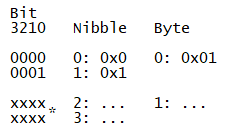
Where:
x: rest duration, silence duration rest duration next command ( * total 8 bits: nibble 2: byte 1 4 low bits, nibble 3: byte 1 4 high bits)
Instruction examples (2 bytes):
0x01 0x00 : Rest duration:0 ( usually at the beginning of each channel )
0x01 0xd5 : Rest duration:213
0x01 0x15 : Rest duration:21
x: rest duration, silence duration rest duration next command ( * total 8 bits: nibble 2: byte 1 4 low bits, nibble 3: byte 1 4 high bits)
Instruction examples (2 bytes):
0x01 0x00 : Rest duration:0 ( usually at the beginning of each channel )
0x01 0xd5 : Rest duration:213
0x01 0x15 : Rest duration:21
- Chord: sets the following chord to play and its duration. If there is rhythm active, the chord will play following that rhythm, but if there is no rhythm active the chord will play continuously.
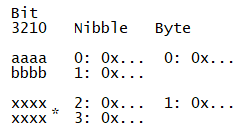
Where:
a: chord root code (total 4bits)
b: chord name code (total 4bits)
x: chord duration ( * total 8 bits: nibble 2: byte 1 4 low bits, nibble 3: byte 1 4 high bits)
Chord root codes are (from 0x1 to 0xB):
Bits
3210
0001 : 1 : C
0010 : 2 : C#
0011 : 3 : D
0100 : 4 : D#
0101 : 5 : E
0110 : 6 : F
0111 : 7 : F#
1000 : 8 : G
1001 : 9 : G#
1010 : 10: A
1011 : 11: A#
1100 : 12: B
Chord name codes are (from 0x0 to 0xF):
Bits
3210
0000 : 0 : MAJOR
0001 : 1 : MINOR
0010 : 2 : 7 TH
0011 : 3 : m7
0100 : 4 : M6
0101 : 5 : 6 TH
0110 : 6 : m7-5
0111 : 7 : SUS-4
1000 : 8 : DIM
1001 : 9 : AUG
1010 : 10: m6
1011 : 11: 7-5
1100 : 12: 9 TH
1101 : 13: 9
1110 : 14: OFF CHORD
1111 : 15: OFF BASS LINE & CHORD (on patent doc is referred as ON CHORD?)
Instruction examples (2 bytes):
0x60 0x06 : Chord:F MAJOR dur:006
0x82 0x03 : Chord:G 7 TH dur:003
0xa1 0x84 : Chord:A minor dur:132
a: chord root code (total 4bits)
b: chord name code (total 4bits)
x: chord duration ( * total 8 bits: nibble 2: byte 1 4 low bits, nibble 3: byte 1 4 high bits)
Chord root codes are (from 0x1 to 0xB):
Bits
3210
0001 : 1 : C
0010 : 2 : C#
0011 : 3 : D
0100 : 4 : D#
0101 : 5 : E
0110 : 6 : F
0111 : 7 : F#
1000 : 8 : G
1001 : 9 : G#
1010 : 10: A
1011 : 11: A#
1100 : 12: B
Chord name codes are (from 0x0 to 0xF):
Bits
3210
0000 : 0 : MAJOR
0001 : 1 : MINOR
0010 : 2 : 7 TH
0011 : 3 : m7
0100 : 4 : M6
0101 : 5 : 6 TH
0110 : 6 : m7-5
0111 : 7 : SUS-4
1000 : 8 : DIM
1001 : 9 : AUG
1010 : 10: m6
1011 : 11: 7-5
1100 : 12: 9 TH
1101 : 13: 9
1110 : 14: OFF CHORD
1111 : 15: OFF BASS LINE & CHORD (on patent doc is referred as ON CHORD?)
Instruction examples (2 bytes):
0x60 0x06 : Chord:F MAJOR dur:006
0x82 0x03 : Chord:G 7 TH dur:003
0xa1 0x84 : Chord:A minor dur:132
- Repeat: encodes the musical symbols necessary to delimit and to repeat specific sections of theme's chord channel.
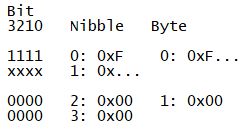
Where:
x: Repeat section code (total 4bits)
Repeat section codes are:
Bits
3210
0000 : 𝄃: start bar line, repeat section start mark.
0001 : :𝄂 end bar line, repeat section end mark.
1000 : 1. repeat x1
1001 : 2. repeat x2
1010 : 3. repeat x3
1011 : 4. repeat x4
1100 : 5. repeat x5
1101 : 6. repeat x6
1110 : 7. repeat x7
1110 : 8. repeat x8
Instruction examples (2 bytes):
0xf0 0x00 : Repeat: repeat section start mark.
0xf8 0x00 : Repeat: x1 (1.)
0xfb 0x00 : Repeat: x4 (4.)
0xf1 0x00 : Repeat: repeat section end mark.
The following image is an example of use of the repeat command in the chords channel:
x: Repeat section code (total 4bits)
Repeat section codes are:
Bits
3210
0000 : 𝄃: start bar line, repeat section start mark.
0001 : :𝄂 end bar line, repeat section end mark.
1000 : 1. repeat x1
1001 : 2. repeat x2
1010 : 3. repeat x3
1011 : 4. repeat x4
1100 : 5. repeat x5
1101 : 6. repeat x6
1110 : 7. repeat x7
1110 : 8. repeat x8
Instruction examples (2 bytes):
0xf0 0x00 : Repeat: repeat section start mark.
0xf8 0x00 : Repeat: x1 (1.)
0xfb 0x00 : Repeat: x4 (4.)
0xf1 0x00 : Repeat: repeat section end mark.
The following image is an example of use of the repeat command in the chords channel:
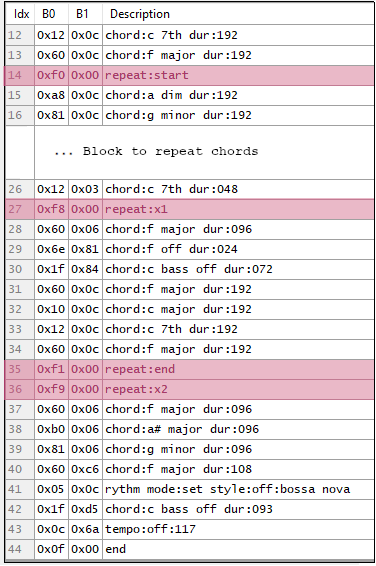
Example of use of the chords repeat command.
- Rhythm: configures the theme's rhythm.
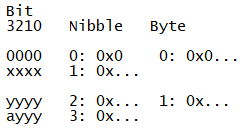
Where:
x: rhythm 'sub' command code (total 4bits)
y: rhythm style code (total 7bits)
a: 0 rhythm is ON , 1 rhythm is OFF(total 1bit)
Rhythm 'sub' command codes are:
Bits
3210
0101 : rhythm command
0110 : fill-in command
1000 : rhythm discrimination command ( metronome marks )
Rhythm style codes are:
Bits
7654 3210
0000 a000 : rock
0000 a001 : disco
0000 a010 : swing 2 beat
0000 a011 : samba
0000 a100 : bossa nova
0000 a101 : tango
0000 a110 : slow rock
0001 a000 : rock'n roll
0001 a001 : 16 beat
0001 a010 : swing 4 beat
0001 a011 : latin rock
0001 a100 : beguine
0001 a101 : march
0001 a110 : ballad
0001 a111 : rock waltz
0010 a010 : latin swing
Instruction examples (2 bytes):
0x05 0x00 : Rtyhm:set style:on:rock
0x05 0x08 : Rtyhm:set style:off:rock
0x05 0x01 : Rtyhm:set style:on:disco
0x05 0x09 : Rtyhm:set style:off:disco
0x08 0x0a : Rtyhm:discrimination style:off:swing 2 beat
0x05 0x02 : Rtyhm:set style:on:swing 2 beat
0x05 0x0a : Rtyhm:set style:off:swing 2 beat
x: rhythm 'sub' command code (total 4bits)
y: rhythm style code (total 7bits)
a: 0 rhythm is ON , 1 rhythm is OFF(total 1bit)
Rhythm 'sub' command codes are:
Bits
3210
0101 : rhythm command
0110 : fill-in command
1000 : rhythm discrimination command ( metronome marks )
Rhythm style codes are:
Bits
7654 3210
0000 a000 : rock
0000 a001 : disco
0000 a010 : swing 2 beat
0000 a011 : samba
0000 a100 : bossa nova
0000 a101 : tango
0000 a110 : slow rock
0001 a000 : rock'n roll
0001 a001 : 16 beat
0001 a010 : swing 4 beat
0001 a011 : latin rock
0001 a100 : beguine
0001 a101 : march
0001 a110 : ballad
0001 a111 : rock waltz
0010 a010 : latin swing
Instruction examples (2 bytes):
0x05 0x00 : Rtyhm:set style:on:rock
0x05 0x08 : Rtyhm:set style:off:rock
0x05 0x01 : Rtyhm:set style:on:disco
0x05 0x09 : Rtyhm:set style:off:disco
0x08 0x0a : Rtyhm:discrimination style:off:swing 2 beat
0x05 0x02 : Rtyhm:set style:on:swing 2 beat
0x05 0x0a : Rtyhm:set style:off:swing 2 beat
- Tempo: sets the theme's playing speed ( the largest the tempo value the shortest the duration of the notes). Would be equivalent to adjust the bpms.
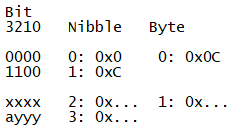
Where:
x: tempo code high (total 4bits)
y: tempo code low (total 3bits)
a: 0 tempo is ON , 1 tempo is OFF
x: tempo code high (total 4bits)
y: tempo code low (total 3bits)
a: 0 tempo is ON , 1 tempo is OFF
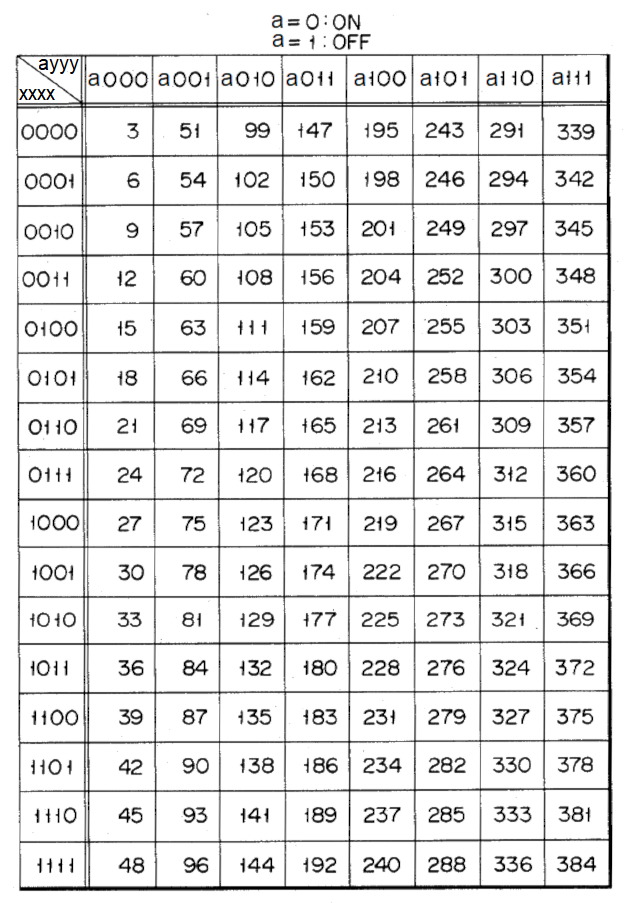
Instruction examples (2 bytes):
0x0c 0xd2 : Tempo:on:210
0x0c 0xd9 : Tempo:off:209 <=Confirmar esto?
0x0c 0x42 : Tempo:on:066
0x0c 0x4a : Tempo:off:066
0x0c 0xa2 : Tempo:on:162
0x0c 0xaa : Tempo:off:162
0x0c 0xd2 : Tempo:on:210
0x0c 0xd9 : Tempo:off:209 <=Confirmar esto?
0x0c 0x42 : Tempo:on:066
0x0c 0x4a : Tempo:off:066
0x0c 0xa2 : Tempo:on:162
0x0c 0xaa : Tempo:off:162
- Counter reset: initialises the counter that counts the time of the rhythm generator.
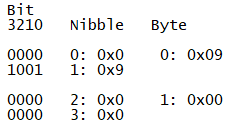
Instruction examples (2 bytes):
0x09 0x00 : Counter reset
0x09 0x00 : Counter reset
- End: end of channel content. It is usually last command in the chords and rhythm channel.
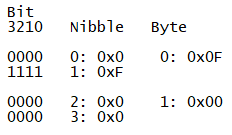
Instruction examples (2 bytes):
0x0f 0x00 : last command of the channel to indicate the end of the chords and rhythm channel.
0x0f 0x00 : last command of the channel to indicate the end of the chords and rhythm channel.
- Double duration: as in the melody channel, double duration command applies over the previous command ( it is never used alone ). It extends the duration of the note and/or the rest encoded in that previous instruction. So if there is a double duration command behind a chord command, the chord duration bits of the previous command are combined with the duration bits of the double duration command to get a larger chord duration value. The same for the duration bits of a rest command. If the previous command does not have chord duration or rest duration parameter then the bits of the double duration command are not considered.
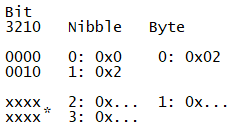
Where:
x: bits that are combined wit the previous command duration bits to extend the chord or rest duration(total 8 bits used as upper 8 bits).
x: bits that are combined wit the previous command duration bits to extend the chord or rest duration(total 8 bits used as upper 8 bits).
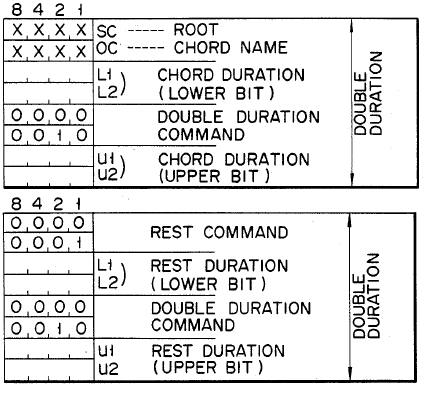
Instruction examples (2 + 2 bytes):
0x12 0x00 0x02 0x30: Chord:C 7TH dur:000 2Xduration:048
0x80 0x08 0x02 0x10: Chord:G MAJOR dur:008 2Xduration:016
0x60 0x02 0x02 0x10: Chord:F MAJOR dur:002 2Xduration:016
0x12 0x00 0x02 0x30: Chord:C 7TH dur:000 2Xduration:048
0x80 0x08 0x02 0x10: Chord:G MAJOR dur:008 2Xduration:016
0x60 0x02 0x02 0x10: Chord:F MAJOR dur:002 2Xduration:016
More information...
In case you want more precise information, it is recommended to check the CASIO US4624171 Auto-playing apparatus patent,
which describes in high detail the organisation of the data inside those CASIO melodies cartridges ( according to Google Patents, this patent expired on 2004-04-05 ). The details and
precise meaning of the bytes inside each theme block is also described in that mentioned patent document US4624171 Auto-playing
apparatus.


